HandBrake是一款专业的支持诸多视频文件格式的视频转换专用工具,根据此软件用户可以方便的开展大批量视频文件格式的转换,而且支持用户对视频规格型号开展任意调节与视频缩小作用。
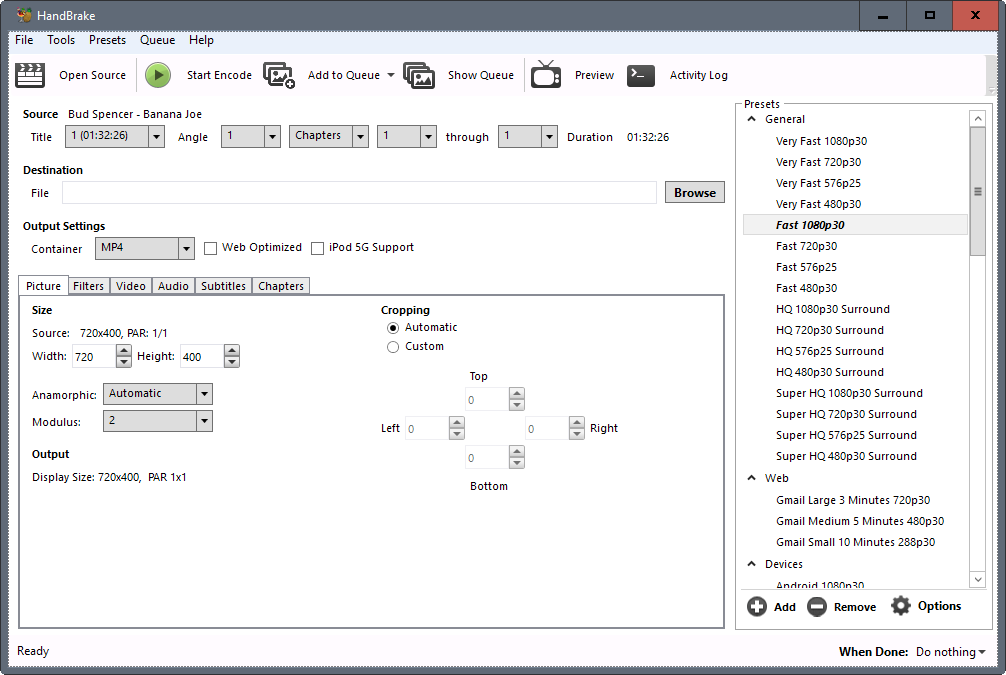
在2016年12月24日宣布发布了1.0.0版本号。该专用工具通常容许沒有版权法的随意视频文档或是DVD/高清蓝光视频源转换变成mp4或是mkv格式。这款专用工具便于应用,与此同时也对于高級用户给予了充足的转换操纵选择项。
例如,用户可以在系统中载入1个或是好几个视频文档,挑选輸出种类,例如Android 720p30, Playstation 1080p30 Surround或是Super HQ 1080p30这些,点一下“逐渐编码”按键就能实行转换工作中。
1.可以在intelSkylake或是升级的cpu上运作全新升级intelQuickSync视频 H.265/HEVC
2.程序流程的表明文本文档早已获得升级
3.在windows系统上的安装文件越来越更小了
4.Windows用户可以中止/修复编码工作中
5.Windows安装器不会再包括命令行界面
6.因为发生了许多问题,最新版本中移除开DirectX Video Acceleration (DVXA)硬件加速器视频编码
7.更新HandBrake应用的第三方库
8.支持Ultra HD/4K颜色根据
9.全新升级的全自动形变方式可利润最大化储存屏幕分辨率,取代石油的固定不动形变方式
10.武器装备提升后的ps滤镜性能最大提高10%,x264编码性能提升10%
General
New online documentation at https://handbrake.fr/docs
Completely overhauled the official presets
New general use presets for broad compatibility
New device presets, now more up-to-date for common devices
New web presets
New Matroska (MKV) presets, including VP9 video with Opus audio
Official presets from HandBrake 0.10.x are still available under Legacy
New JSON-based preset system including command line support
New JSON-based API for interacting with libhb
Improvements to audio/video sync engine to better handle difficult sources
Many miscellaneous bug fixes and improvements (over 1700 code commits!)
Video
VP9 video encoding via libvpx
Intel QuickSync Video H.265/HEVC encoder
Requires Intel Skylake or newer CPU
Ultra HD / 4K color pass through (support for BT.2020)
Additional standard frame rate selections in the graphical interfaces
New Auto anamorphic mode maximizes storage resolution, replaces Strict anamorphic mode
New Pad filter (command line only for now)
New Decomb/Deinterlace filter settings and improved defaults
Rotate filter now available in all graphical interfaces
New NLMeans filter tunes Tape and Sprite for analog tape recordings and vintage video games, respectively
Assembly opTIMizations NLMeans filter improve performance up to 10%
Assembly optimizations in x264 encoder improve performance for faster presets by 5-10%
x265 encoder quality improvements, especially when using tune grain
High bit depth encoding support via external shared libraries (video pipeline is still 8-bit 4:2:0)
x264 10-bit
x265 10-bit and 12-bit
Audio
Opus audio encoding/decoding via libopus
Passthru now supports E-AC-3, FLAC, and TrueHD audio formats
Subtitles
Improved subtitles rendering for some languages via HarfBuzz
Miscellaneous subtitles improvements
Command line interface
Presets can now be imported and exported from the command line and are compatible with the graphical interfaces
Queue exported from the graphical interfaces can now be imported by the command line interface (Linux and Windows only for now)
Build system
Add scripts to manually build and install Mac and MinGW-w64 (compile for Windows on Linux) toolchains
Add support for multiple source URLs for third-party downloads
Add SHA256 hash verification for third-party downloads
Add configure parameter to disable or filter allowed third-party downloads (see configure --help)
Use HTTPS everywhere; the few cases where a third-party does not provide packages over https, handbrake.fr does
New targets on Mac to install and uninstall after building
Add flatpak packaging support (experimental)
Third-party libraries
Updated libraries
FreeType 2.6.5 (subtitles)
Fontconfig 2.12.1 (subtitles)
FriBidi 0.19.7 (subtitles)
Libav 12 (encoding/decoding/muxing)
libass 0.13.2 (subtitles)
libbluray 0.9.3 (Blu-ray decoding)
libmfx v6.0.0 (Intel QuickSync Video encoding/decoding)
libvpx 1.5.0 (VP8/VP9 video encoding)
x264 148 r2708 (H.264/AVC video encoding)
x265 2.1 (H.265/HEVC video encoding)
New libraries
HarfBuzz 1.3.0 (subtitles)
libopus 1.1.3 (Opus audio encoding)
 相关攻略
相关攻略 转换mp4格式视频编码怎么选择_视频怎么转格式mp4_怎么看mp4的编码格式编码转换软件_编码转换软件下载_编码转换软件有哪些GamesToday官方版下载_gamestoday官方版下载_gamestoday官方版下载安卓可口可乐商家编码怎么查询_可乐视频怎么看不了呀桃子视频app下载_桃子视频app下载安装无限看免费-苏州晶体公司io_桃子视频app下载官方版咪咕视频新用户怎么领会员?_咪咕视频新用户领会员的方法图像编码是()的主要编码形式。准星精灵官方版_准星精灵官方版下载_准星精灵官方版下载安装优化即梦AI:实现低码率视频导出与压缩编码策略详解蜜柚视频app_蜜柚视频app下载免费版下载新版要注消怎么注消_蜜柚视频app软件下载 - 官方版APP下载
 相关专题
相关专题代码转换可以转换数字文件,使文件的内容可以在不同的播放设备上正常播放。编码转换器的主要功能类似于翻译器,它可以将文件转换为最终用户所需的格式。转换基于复杂的操作,需要大量的程序资源。此时,我们需要一个有用的编码转换工具,来看看小编推荐的一些有用的编码转换工具。多特软件专题为您提供编码转换工具,utf8编码转换,ascii在线转换工具。多特软件站只提供绿色、无毒、无插件、无木马的纯绿色软件下载。


本专题汇集了多款高效实用的编码转换应用,旨在满足用户在不同场景下的编码需求。无论是字符编码、条形码、二维码还是其他特殊格式的转换,这些应用都能提供快速准确的解决方案。我们精选了多个平台和版本的软件,确保兼容性和用户体验。无论您是开发者、学生还是日常办公用户,都能在这里找到适合自己的工具,轻松应对各种编码转换任务。立即下载,体验便捷高效的编码转换服务。



多特软件园为您整理了多款适合影视工场app官方版,在多特您能下载多款正规的、无毒软件,在这里安卓版苹果版等应用应有尽有,找适合影视工场app官方版就来多特软件站吧。
Unicode编码转换器是一款十分好用的文本与unicode码转换小工具。Unicode转换器,是用以将文本和Unicode编码相互之间转换的专用工具,可以迅速地将二者互相转换,有利于科学研究文档编码方式。一般的客户将会不用unicode转换器该类专用工具,可是在浏览一些Unicode网址时将会必须开展编码转换,这时能够开展设定。在电脑浏览器的莱单中点一下“查询”-“编码设定”,选定“UTF-8(Unicode)”新项目就可以将当今网页页面以Unicode编码方式展现。Unicode编码转换器关键作用是能够便捷查寻标识符的unicode码,或查寻unicode码相匹配的标识符。能够将文本大批量转换为unicode码,文本与unicode码转换小工具是一款绿色免费的软件。


多特手游专题为您提供人社app官方版,肇庆人社app。安卓苹果版一应俱全,找人社app官方版就来多特软件站下载!











 同类排行
同类排行



 最近更新
最近更新