canvas提供了一个重要的方法toDataURL(),这个方法能把画布里的图案转变成Base64编码格式的png或者其他格式的图片(根据你传入的mine类型的参数),然后返回 Data URL数据。
接下来我们看具体是怎么实现的。
html页面一个canvas画布:
Stream Vera Sans Mono', 'Courier New', Courier, monospace !important; word-WRAP: break-word; BACKGROUND: none transparent scroll repeat 0% 0%; FLOAT: none !important; HEIGHT: auto !important; FONT-SIZE: 10pt !important; VERTICAL-ALIGN: baseline !important; BORDER-TOP: 0px; TOP: auto !important; RIGHT: auto !important; FONT-WEIGHT: normal !important; BORDER-RIGHT: 0px; PADDING-TOP: 0px !important; LEFT: auto !important">1 |
<canvas id="canvas"> |
2 | <buttonApple-converted-space"> class="button-balanced" id="save">save |
4 | <a href="" download="canvas_love.png" id="save_href"> |
5 | <img src="" id="save_img"/> |
对应的js代码实现:
01 | var c=document.getElementById("canvas"); |
02 | function drawLove(canvas){ |
03 | let ctx = canvas.getContext("2d"); |
05 | ctx.fillStyle="#E992B9"; |
07 | ctx.bezierCurveTo(75,37,70,25,50,25); |
08 | ctx.bezierCurveTo(20,25,20,62.5,20,62.5); |
09 | ctx.bezierCurveTo(20,80,40,102,75,120); |
10 | ctx.bezierCurveTo(110,102,130,80,130,62.5); |
11 | ctx.bezierCurveTo(130,62.5,130,25,100,25); |
12 | ctx.bezierCurveTo(85,25,75,37,75,40); |
17 | var butSave = document.getElementById("save"); |
18 | butSave.onclick=function(){ |
19 | var svaeHref = document.getElementById("save_href"); |
24 | var img = document.getElementById("save_img"); |
25 | var tempSrc = canvas.toDataURL("image/png"); |
26 | svaeHref.href=tempSrc; |
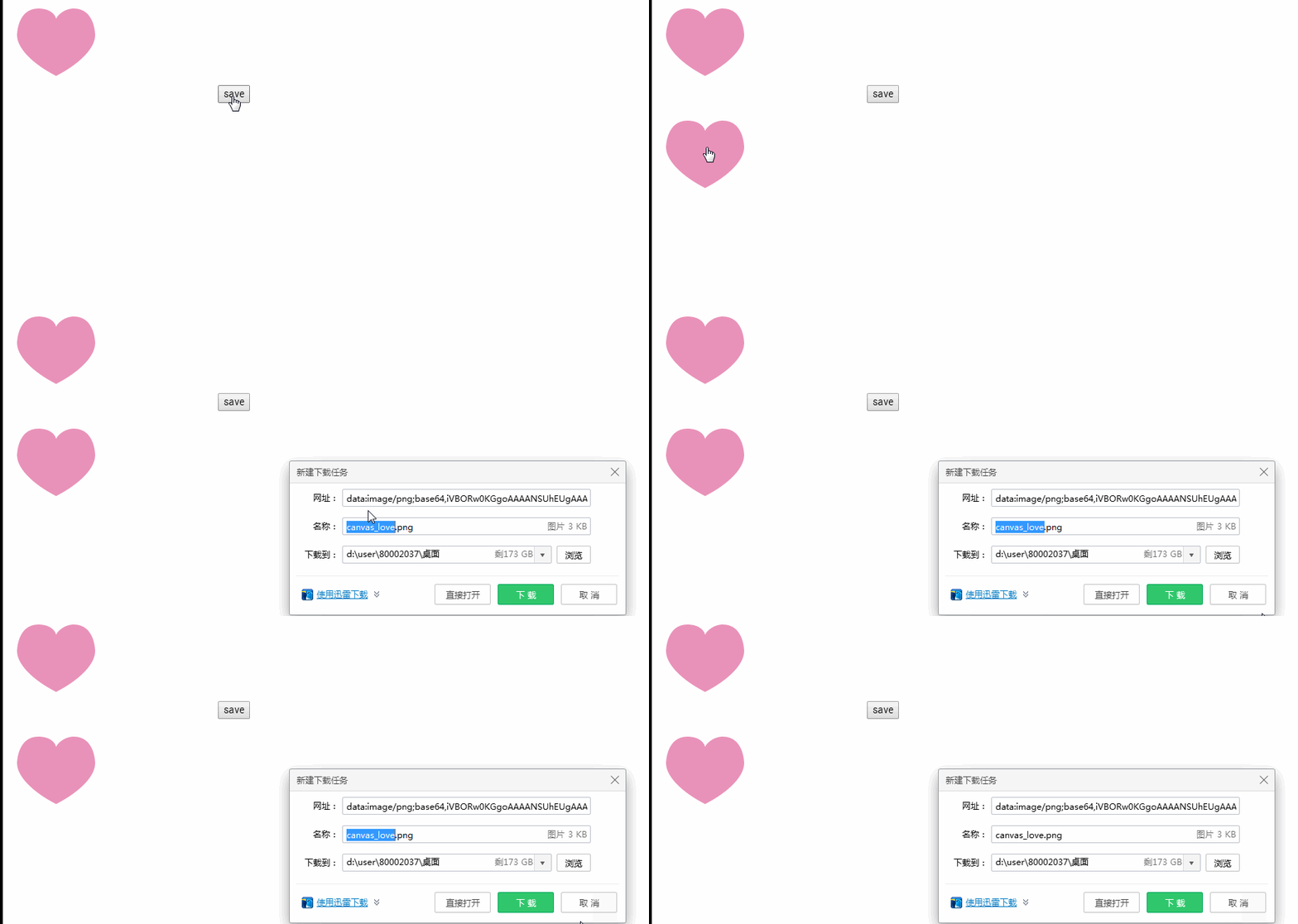
点击save按钮后,显示图片,点击图片即可弹出下载对话框。
效果如下:







 相关攻略
相关攻略
 近期热点
近期热点
 最新攻略
最新攻略